The table “Items” has the following columns
-
Id (t): Install Id of SAFO program that provided record
-
AC (t): coded AC name of this record
-
TuneStamp (i) : time this user has accessed the database
Note: (i) denotes an integer field, (t) a text field
An example may look as follows (extract):
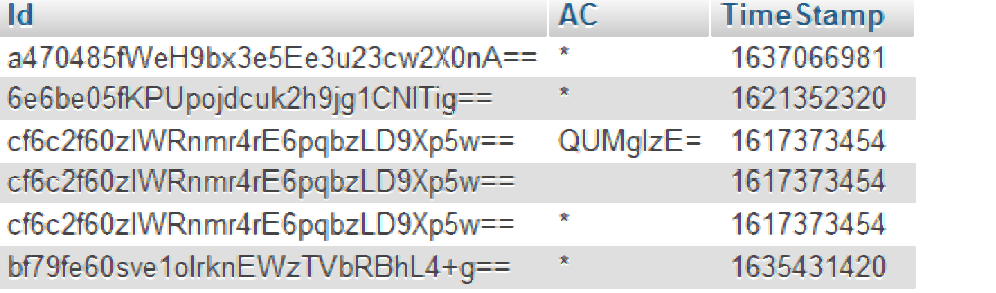
The AC name is B64-coded which allows free usage of names in strings communicated between the SAFO programs and the database – it indicates that the SAFO program with the listed Id has the authority to change the schedule parameter (time and target temperature values) in the same way the regular SAFO program has, but only for this particular AC. This is typically the SAFO Tenant version, and one such installation may update the schedule for more than AC (in which case there are several records, one for each AC).
If the AC field is blank, the records serves as a place holder after the tenant version has been installed but before the ACs have been assigned to this tenant – a step to be performed within the main administrative version of SAFO which has control of the AC,
A “*” in the AC field denotes that this SAFO installation is one that can run the AC schedules and also update the schedule parameter of any of the ACs. The first such record usually points to the installation that currently has control – the others are in standby mode. Each such installation sends a alive message to the database, updating the timestamp. If an installation fails to update the timestamp, the database logic will pick the first installation with a more recent timestamp to take control. This also happens if the first installation comes back, in which case the second installation will be placed into standby mode before the first becomes active again.