The following window is displayed to show detailed information about one particular Action Plan:
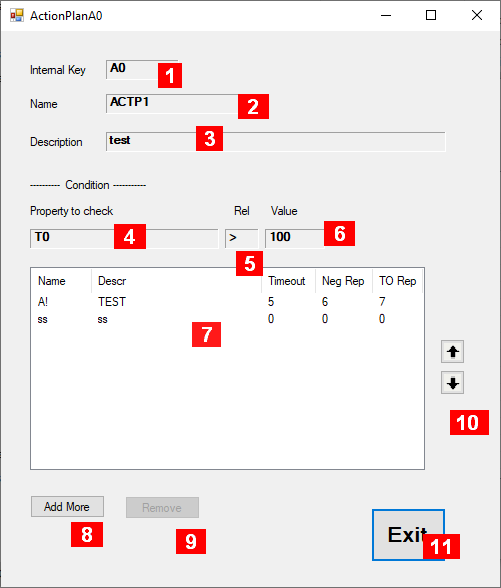
Details about the fields in this panel:
-
Internal Key – a unique identifier maintained by the system
-
Name – an acronym maintained by the user
-
Description – some useful information maintained by the user
-
Condition: Property to check – Reference to a Temperaturefile or an Alarm object to check whether to run this Action Plan – if “<none>” plan will execute unconditionally
-
Condition: Rel – how to check for the condition. Click on field repeatedly to get one of the possible options
-
Condition: Value – the value to check for the condition check.
-
Table listing individual actions. Each line represents an action item to be executed consecutively in the order they appear in this table. Click on a line to have a look at that particular action item, where you can change some attributes.
-
Add More – to the action table
-
Remove – selected item from the action table
-
Buttons that allow you to move selected items up or down in the action table
-
Exit – closes this window.