The following window is displayed to show detailed information about an Alarm Holder Object:
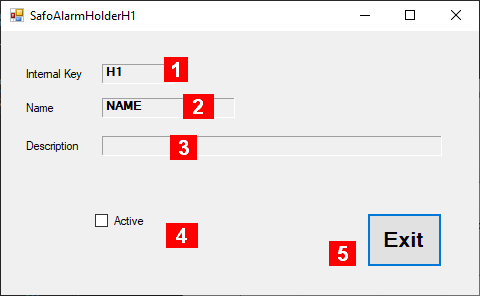
Details about the fields in this panel:
-
Internal Key – a unique identifier maintained by the system (1)
-
Name – an acronym maintained by the user (1)
-
Description – some useful information maintained by the user
-
Active – Check mark is set if Alarm Holder is active. Status can be changed by clicking here
-
Exit – Closes the window
Notes:
-
Both fields are used together to identify the Alarm Holder Object (filename). If the name is changed, a different Alarm Holder object is accessed via the resulting changed filename.