The following window is displayed to show detailed information about an Email Object:
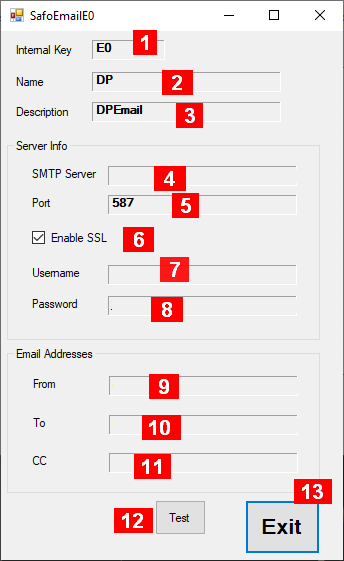
Details about the fields in this panel:
-
Internal Key – a unique identifier maintained by the system
-
Name – an acronym maintained by the user
-
Description – some useful information maintained by the user
-
SMTP Server – the Email Server to be used for outgoing emails (1)
-
Port – the Port number of the Email Server (1)
-
Enable SSL – check if SSL is enabled (1)
-
Username – the username of the email account used for the email server (1)
-
Password – the password for the username of the email account used for the email server (1)
-
From – the email address placed into the “From” field of the email
-
To – the “To” destination of the email
-
CC – the “CC” destination of the email
-
Test – click to verify if server and email information is correct and sends a test email (2)
-
Exit – closes this window
Notes:
-
The info for the outgoing email server is setup the same way as it is for example in the email client “Thunderbird”
-
A message box will appear with either success or an error message from the server (you need to check your email inbox to verify proper receipt).