The following window is displayed to show detailed information about one particular Maintenance Schedule
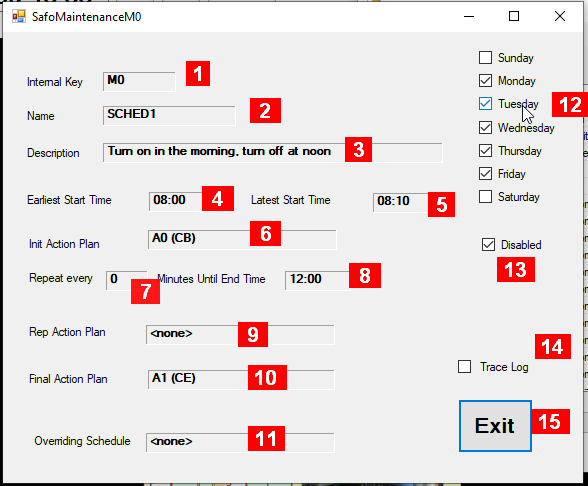
Details about the fields in this panel:
-
Internal Key – a unique identifier maintained by the system
-
Name – an acronym maintained by the user
-
Description – some useful information maintained by the user
-
Earliest Start Time – time for this schedule to start (1)
-
Latest Start Time – time for this schedule to start (1)
-
Init Action Plan – Reference to an action plan to execute at the start of the schedule
-
Rep every <nn> Minutes – Time to wait between repeated actions within the schedule (0 = no such repeated activity)
-
Until End Time – Time to stop the schedule, esp. repeated activities (1)
-
Rep Action Plan – Reference to an action plan to execute repeatedly while schedule is active
-
Final Action Plan – Reference to an action plan to wrap it up when End Time has arrived
-
Overriding Schedule – Reference to a schedule to be suspended when this is running
-
Weekdays for this Schedule to run (check if desired)
-
Disabled – Set if this schedule not to run under any circumstance
-
Trace Log – Puts an entry into the trace file if any action occurs from this schedule
-
Exit to close this window.
(1) Time is displayed and expected to be entered in 24-hour format. Earliest and latest start time define the time window when the schedule can start, i.e. if the SAFO program is active during this time. The latest time or end time will always be after the earliest start time – if it appears to be before it, the time in question on the next day (indicated by a plus sign, for instance like “07:00+”).