The following window is displayed to show detailed information for a Setup of a Special Object:
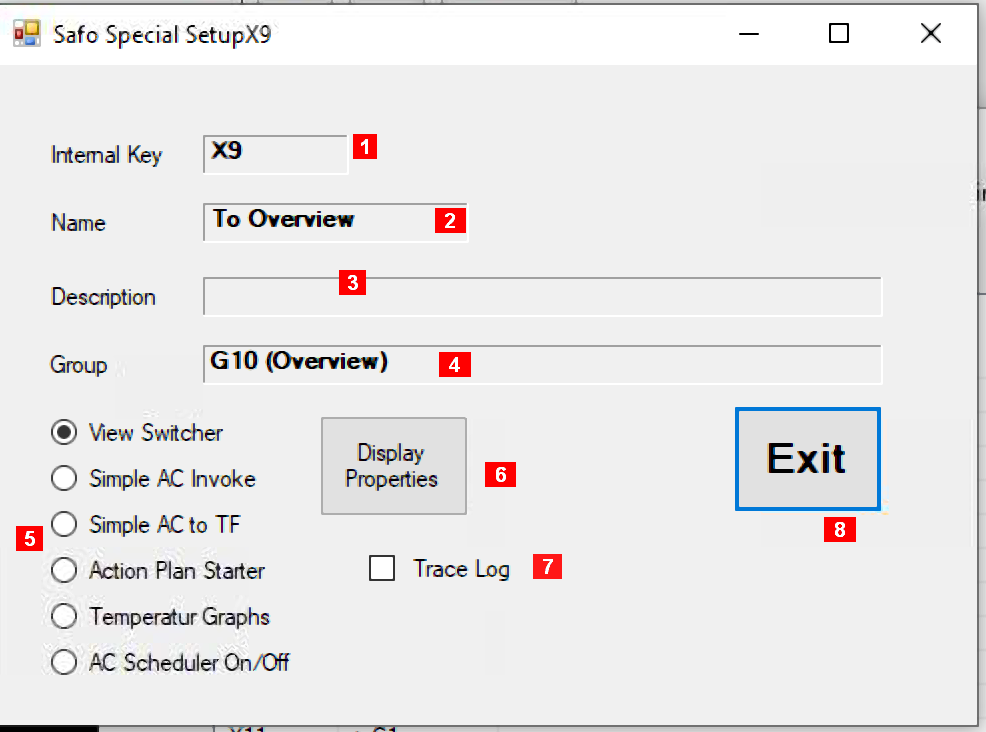
Details about the fields in this panel:
-
Internal Key – a unique identifier maintained by the system
-
Name – an acronym maintained by the user
-
Description – some useful information maintained by the user
-
Group – the target group (1)
-
Function – the function invoked when the item is hit (1)
-
Display Properties – opens a dialog to setup properties of the image to be used to invoke the function
-
Trace Log – adds an event into the trace file if the function “Simple AC Invoke” is activated (no effect for any other function
-
Exit – closes this window.
Notes:
-
There are these available functions (click left to invoke the function, click right to change some details for that function):
-
View Switcher – The display in the main window changes as if the corresponding sub menu in the “View” menu was hit. Thus the image works as a short cut or linkage to another view.
-
Simple AC Invoke – A window is opened with an overview of the AC schedule for the AC unit represented by the group
-
Simple AC to TF – The AC schedule for the AC unit represented by the group is placed into a text file which can be printed
-
Action Plan Starter – The function starts the specified action plan.
-
Temperature Graph – A window is opened that displays the history of temperature values of the selected group.
-
AC Scheduler On/Off – a template to hook a view to AC schedule suspension.