The following window is displayed to show detailed information about a subgroup within a DIN Relay or Web Switch (there is not difference from the software perspective of these devices):
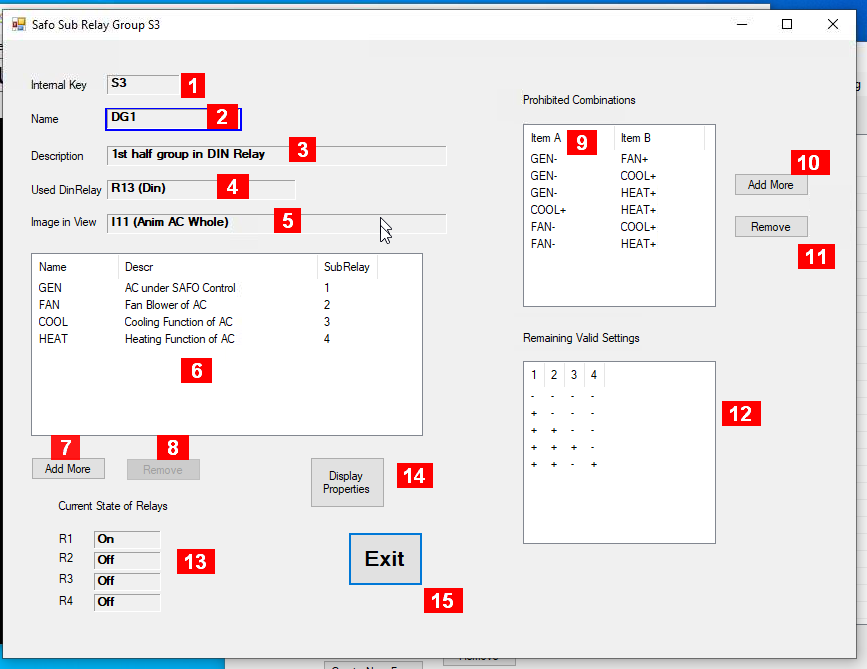
Details about the fields in this panel:
-
Internal Key – a unique identifier maintained by the system
-
Name – an acronym maintained by the user
-
Description – some information maintained by the user
-
Used DinRelay – Reference to used Din Relay where the sub relays are located
-
Image in View – a reference to an image to be used to show the state of individual sub relays
-
List of sub relays included in this group – a click on one line allows to edit data of this particular sub relay
-
Button to add one more line for one sub relay
-
Button to remove line currently selected in the list of sub relays
-
Table of sub relay pairs with states not allowed to occur at the same time – click on one field to change the contents of that one field
-
Button to add one more line of the prohibited sub relay state pairs
-
Button to remove line currently selected in the list of prohibited pairs.
-
List of valid relay states within this group still allowed remaining after considering all prohibited combinations (the columns left to right reflect the list of sub relays from top to bottom – the column number is not the sub relay number)
-
Current state of all relays (shown only when address, username and password are provided). Click here to toggle on/off (the validity within this group will be checled)
-
Button to link to additional display properties
-
Exit to close this window.
The state of each of the individual relay can be one of the following:
-
Off – relay is in off position
-
On – relay is in on position
-
Pending – a change of state has been sent to the relay but change has not been confirmed yet
-
Unknown – No response has been received to get the state of the relay