One of the following windows is displayed to show detailed information about Temperature Files:
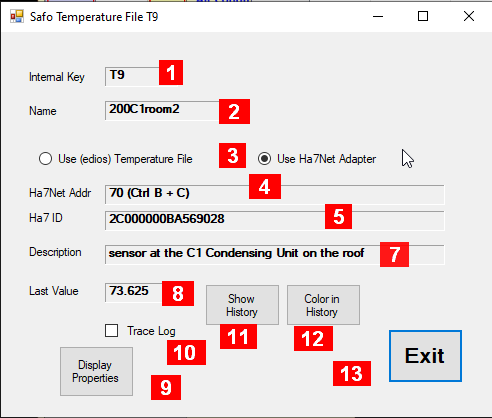
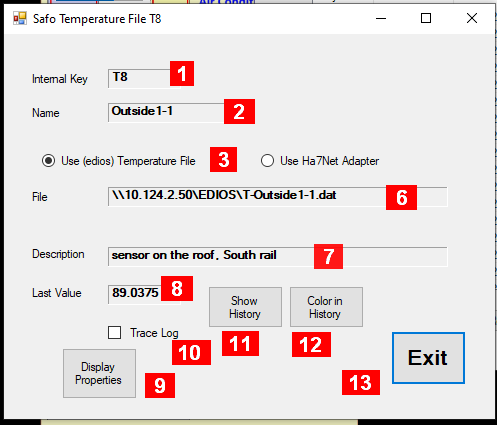
Details about the fields in this panel:
-
Internal Key – a unique identifier maintained by the system
-
Name – an acronym maintained by the user
-
Selector which method to use to retrieve temperature values
-
Ha7Net Addr -reference which Ha7Net Adapter use (1)
-
Ha7 ID – Identifier within the Ha7Net Adapter (1)
-
File – the filaname with the temperature values provided by EDIOS (2)
-
Description – some useful information maintained by the user
-
Last value – the temperature value returned from the last read in Fahrenheit (read only)
-
Display Properties – goes to a panel where and how the temperature value is displayed in other views
-
Trace Log – Saves temperature values in the trace file
-
Show History – A window is opened that displays the history of the temperature values.
-
Color in History – Allows to select a color for this item if several of such items a displayed together in one group.
-
Exit – to close this window
Notes:
-
Shown only if “Use Ha7Net Adapter” is selected
-
Shown only if “Use (edios) Temperature File” is selected