The following window is displayed to show detailed information about a general group
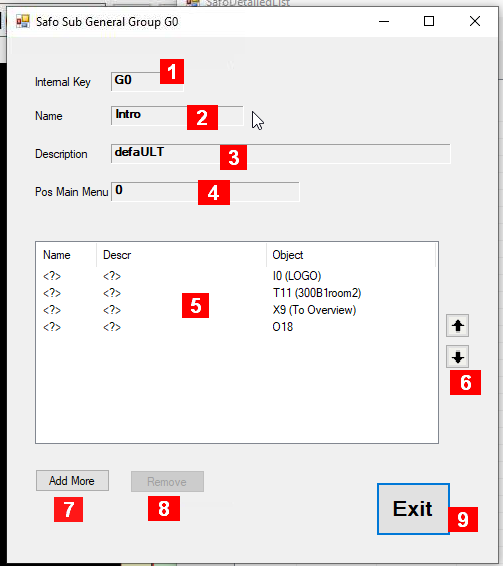
Details about the fields in this panel:
-
Internal Key – a unique identifier maintained by the system
-
Name – an acronym maintained by the user; if this is a view the name will appear in the sub menu list of the menu “View” of the main panel.
-
Description – some information maintained by the user
-
Pos Main Menu – if this group defines a view, number defines the zero-based position in the sub menu list of the menu “View” of the main panel.
-
List of objects to be included in the new, with some more information about them. If this is a view, the order is relevant which objects are displayed first (text, images), potentially obscuring objects already drawn earlier in the list. A click on a line will open a window allowing you to modify the contents of this line item.
-
Arrows to move any line of the list up or down
-
Add More – Adds one more empty line to the list.
-
Remove – removes the selected line from the list.
-
Exit – closes this window.