This user interface is designed to write/modify schedules for Temperature Settings for one Air Conditioning Units based on weekdays and time of day. The layout of this panel is not configurable – the data are driven by the corresponding view associated with the special function that invokes this panel.
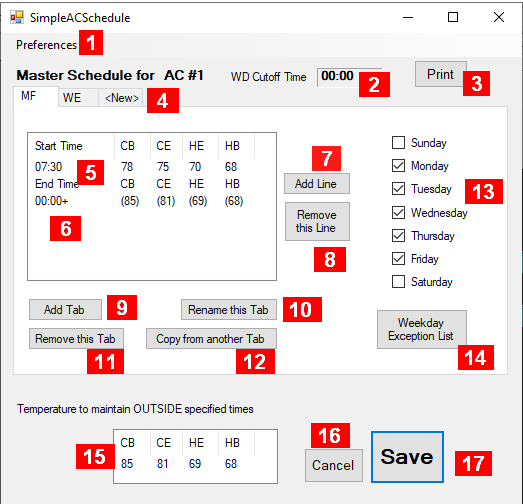
Layout with 4 temperature columns
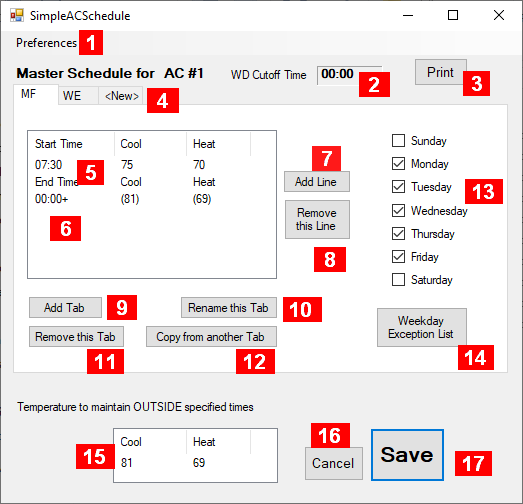
Layout with 2 temperature columns
Details about the fields in this panel
-
Preferences – Defaults, 2 or 4 column mode etc (see here)
-
WD Cutoff Time – the time SAFO will consider a start of a new weekday
-
Print – Button to print the whole schedule for this AC unit
-
Named Tabs for each weekday or a group of weekdays
-
Start Time – the time and the temperature values should apply from that time on to the next (1)
-
End Time – the time the last start should end (1) (2)
-
Add Line – to add one more line with start time and applicable temperature values
-
Remove this Line – delete currently selected line (3)
-
Add Tab – to add one more (empty) tab
-
Rename this Tab – to give this tab another name
-
Remove Tab – remove entire table under this tab (4)
-
Copy from another Tab – the table from another tab will be copied into this tab (5)
-
Weekdays this tab should apply (6)
-
Weekday Exception List – TBA
-
Temperature values to be applied when no other tab with their start and end time would be active
-
Cancel – back out all changes since last save and close the window
-
Save – save the data and close the window (7)
Notes
-
Click on field showing time or temperature value to make a change – see remarks at the end of this page about the relationship between the temperature values and start and end times.
-
The temperature values are copied from the OUTSIDE table and cannot be changed here
-
The End Time cannot be removed
-
The last Tab cannot be removed.
-
The check marks for the weekdays will be unchecked, as it is not allowed to mark the same weekday as active in more than one tab.
-
A Tab can have all weekdays unchecked.
-
The save generates a new version of the configuration file – see here for further information.
The temperature columns have the following meaning (4 column mode):
-
CB – Cooling Begin: if the current temperature is higher than the indicated value, cooling should start
-
CE – Cooling End: if the current temperature reached a lower value than the indicated one, cooling should stop
-
HE – Heating End: if the current temperature reached a higher value than the indicated one, heating should stop
-
HB – Heating Begin: if the current temperature is lower than the indicated value, heating should start
In 2-column mode only Cool and Heat are shown. They correspond to the CE and HE values shown in 4-column mode, respectively. CB and HB values are modified automatically when changing CE or HB – as determined in the preferences.
The temperature values on one line should be descending when reading from left to right.
If you change the start time or end time in the table, the table contents will be updated to maintain the chronological order and the assigned temperature values will be moved along with it. If the change is such that a previous end time would become a new start time (making the latest start time the new end time), temperature values may be assigned some default values.