This user interface allows to set some preferences common for all temperature settings in the main panel for this AC unit:
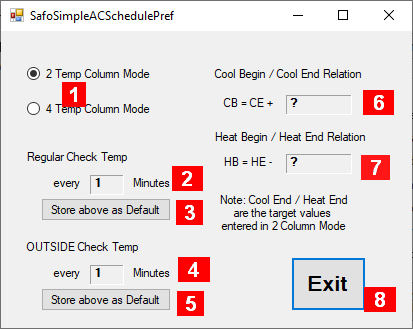
Details about the fields in this panel:
-
Selector between 2 or 4 Temperature Column Mode of the main panel
-
Frequency of how often the Temperature File should be checked and the AC adjusted if particular schedule (tab) is active
-
Value of (2) should be applied as default the same way for scheduling of other AC units when one is created
-
Frequency of how often the Temperature File should be checked and the AC adjusted if no particular schedule (tab) is active
-
Value of (4) should be applied as default the same way for scheduling of other AC units when one is created
-
Value of CB relative to CE if CE is modified (1)
-
Value of HB relative to HE if HE is modified (1)
-
Exit – closes this window.
Notes:
-
Not shown if 4 Temperature Column Mode selected.