Thia is an example how a view showing a single AC can look like.
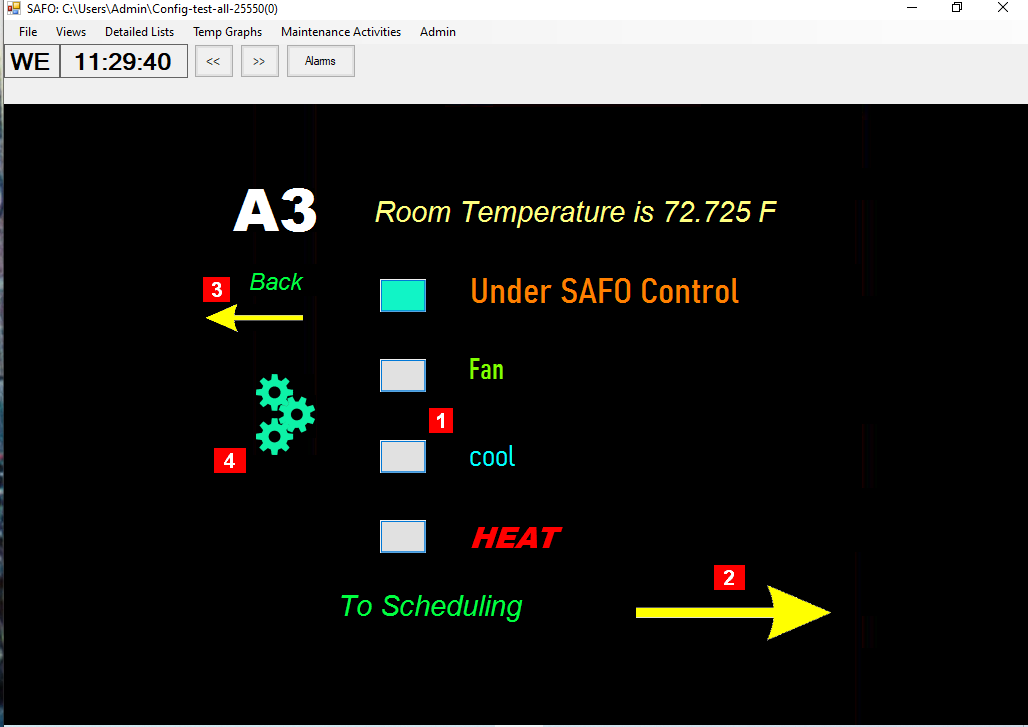
The following elements are clickable:
-
Four buttons, one for each sub relay, each indicating by color the state of the relay. Click to turn the component on or off.
-
A link for a simplified, comprehensible user interface way to administer the AC scheduling
-
A link to an overview page (also a view) where other views can be accessed from.
-
A gear image indicating whether the maintenance schedule is suspended or not. Click to turn the suspension on or off.
Note that all elements shown on this page are configurable: the images are loaded from external image files, and the texts are text references where you can specific the contents, font, color and size. As such, this view is not part of the special functionality (views are part of the general functionality) but rather an example of setting up a view for a particular purpose, in this case access to a particular AC unit. The images for the buttons and the gear are from gif files with several frames, and the selection of which frame to use in a particular state is hard-coded, but the looks is not, and the user may put in another image file provided that the frames match what a user might expect to be displayed in each state.